
Scaling Reads
Reads dominate writes 100:1. Scale in three tiers: optimize the database (indexing, denormalization), scale horizontally (replicas, sharding), then add caching (Redis, CDN). Start simple. Most candidates jump to caching too early.

30-second elevator pitch: "Read traffic grows exponentially faster than writes. I handle this in three tiers: first optimize the existing database with indexes and denormalization, then scale horizontally with read replicas, and finally add caching layers. Each tier builds on the previous one, and I always start with the simplest solution."
The Problem
Consider an Instagram feed. When you open the app, dozens of photos load. For each photo, the app fetches image metadata, user information, like counts, and comment previews. That is 100+ read operations just to load your feed. Meanwhile, you might only post one photo per day - a single write.
This imbalance is everywhere:
Twitter/X - For every tweet posted, thousands read it. Viral tweets: millions of reads.
Amazon - For every product uploaded, hundreds browse it. During sales: millions of reads.
YouTube - Billions of video views daily, millions of uploads. A 1000:1 ratio.
The standard read-to-write ratio starts at 10:1 and reaches 100:1 or higher for content-heavy applications.
This is not a software problem you can debug your way out of - it is physics. CPU cores can only execute so many instructions per second, memory can only hold so much data, and disk I/O is bounded by hardware speed. When you hit these physical constraints, only architectural solutions work.
13 problems that use this pattern: Ticketmaster, Bit.ly, Instagram, Facebook News Feed, YouTube Top K, Yelp, Distributed Cache, Rate Limiter, YouTube, Facebook Post Search, Local Delivery Service, News Aggregator, Metrics Monitoring.
What You Will Learn
Tier 1: Optimize Your Database (cheapest, start here)
- Indexing (B-tree, composite indexes)
- Hardware upgrades (vertical scaling)
- Denormalization (pre-join tables)
- Materialized views (precompute aggregations)
>
Tier 2: Scale Horizontally (when single DB hits ceiling)
- Read replicas (leader-follower replication)
- Database sharding (functional, geographic, hash-based)
>
Tier 3: Add Caching (highest throughput, most complex)
- Application-level caching (Redis, Memcached)
- Cache invalidation (TTL, write-through, write-behind, tagged, versioned keys)
- CDN and edge caching
>
Deep Dives (what interviewers ask next)
- Hot key problem and request coalescing
- Cache stampede and thundering herd
- Cache versioning for race-free invalidation
- Replication lag and read-your-own-writes
The Solution: Three-Tier Progression
Read scaling follows a natural progression from simple optimization to complex distributed systems. Each tier builds on the previous.
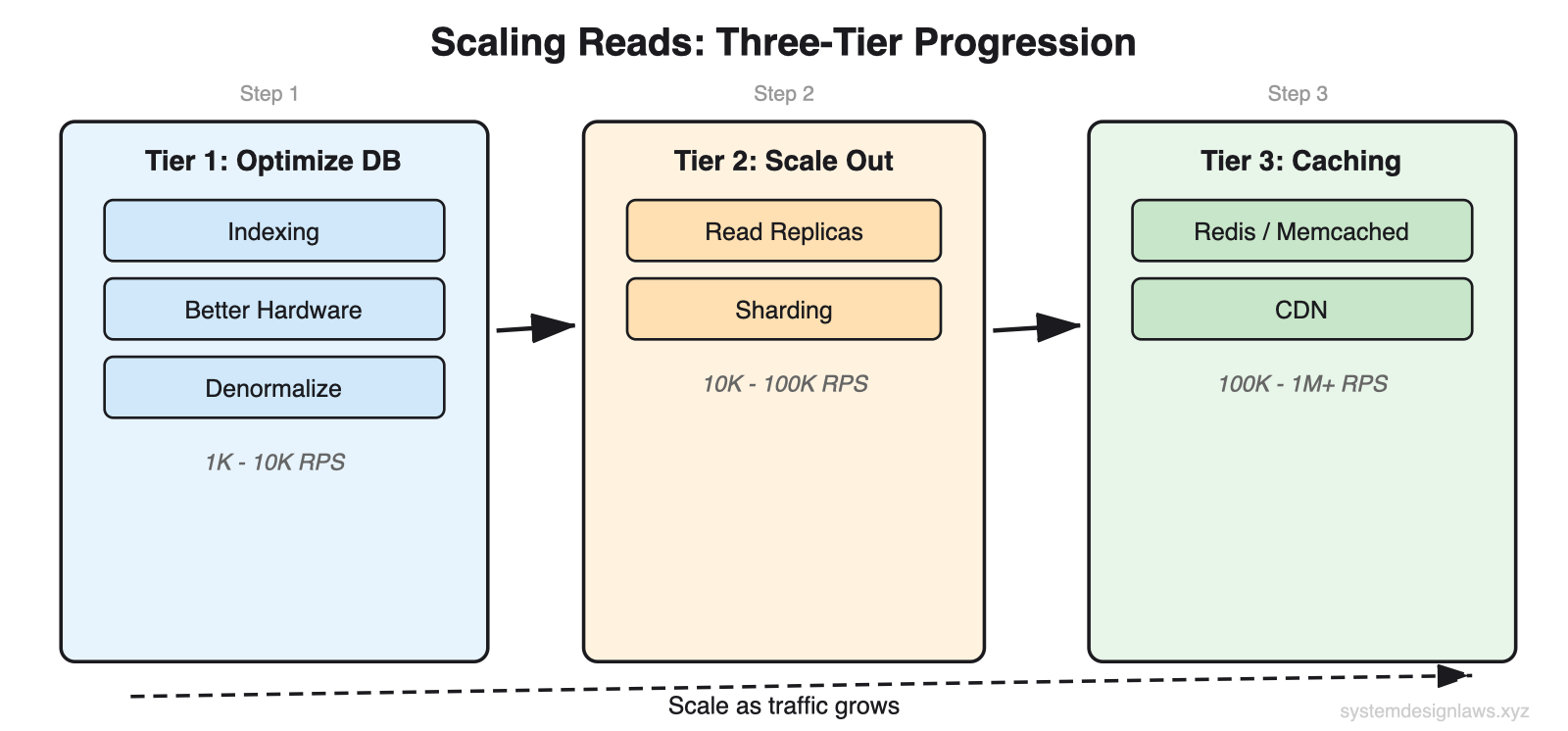
What interviewers want to hear: "Before adding infrastructure, I would optimize the existing database. If that is not enough, I would scale horizontally. Caching is my third tier - it gives the biggest throughput gains but adds the most complexity." Most candidates jump straight to Redis. Start with what you have.
Tier 1: Optimize Within Your Database
Before adding more infrastructure, there is typically plenty of headroom in your existing database. Most read scaling problems can be solved with proper tuning and smart data modeling.
Indexing
An index is a sorted lookup table that points to rows in your actual data. Think of it like a book index - instead of scanning every page to find mentions of "database," you check the index at the back which tells you exactly which pages to look at.
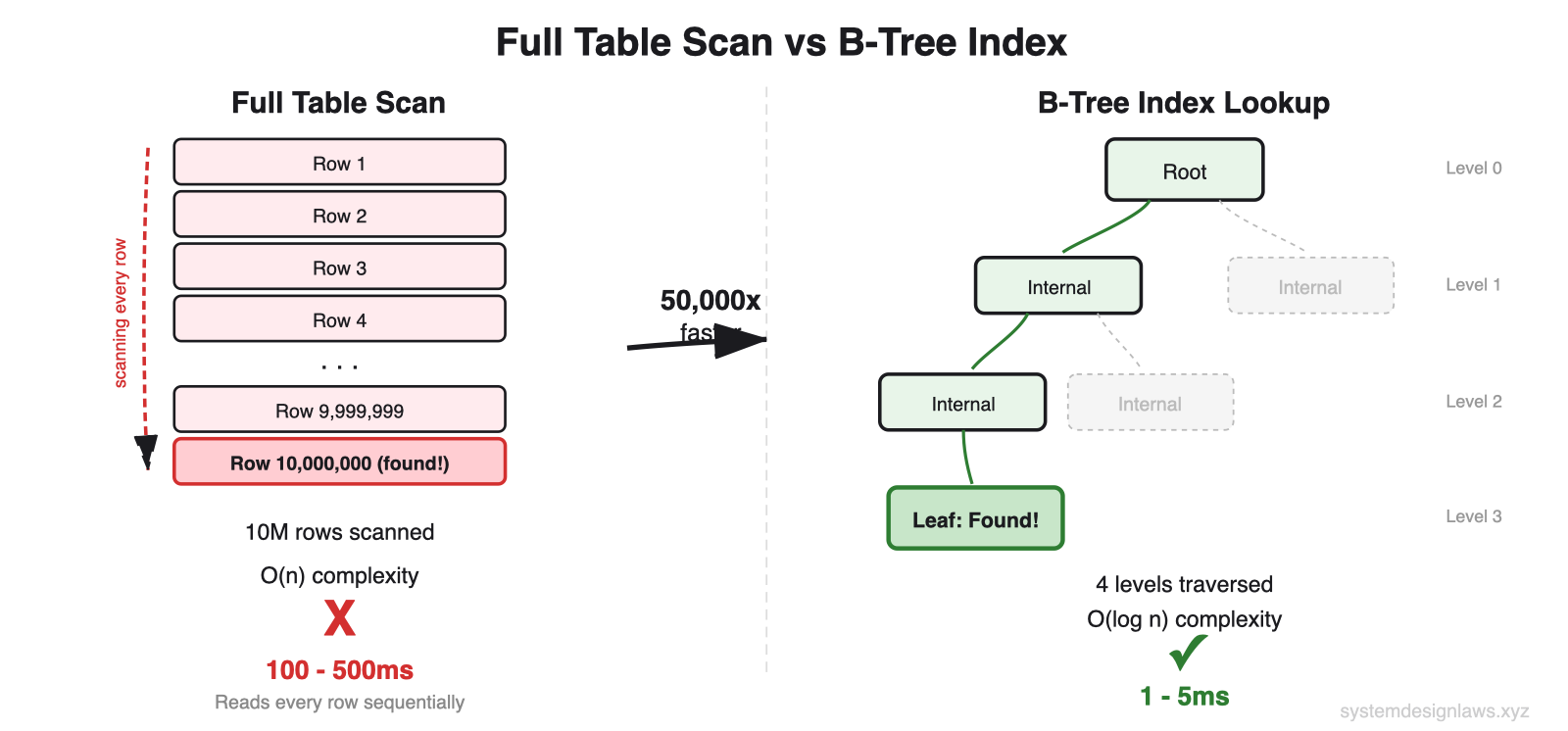
Without an index, the database performs a full table scan - it reads every single row to find matches. With an index, it jumps directly to the relevant rows. This turns a linear O(n) operation into a logarithmic O(log n) operation: the difference between scanning 1 million rows versus checking about 20 index entries.
Schema: users table
id integer, primary key - Unique user identifier
email varchar(255), indexed - Most common lookup field
name varchar(100) - Display name
created_at timestamp, indexed - Account creation date
Without index - Full table scan of 10M rows. Cost: ~412,000 units. Time: 100-500ms. The database reads every row checking if email matches.
With index on email - Index scan. Cost: ~8 units. Time: 1-5ms. Jumps directly to the matching row.
What to index: Columns you filter on, join on, or sort by. If users search posts by hashtag, index the hashtag column. If you sort products by price, index price.
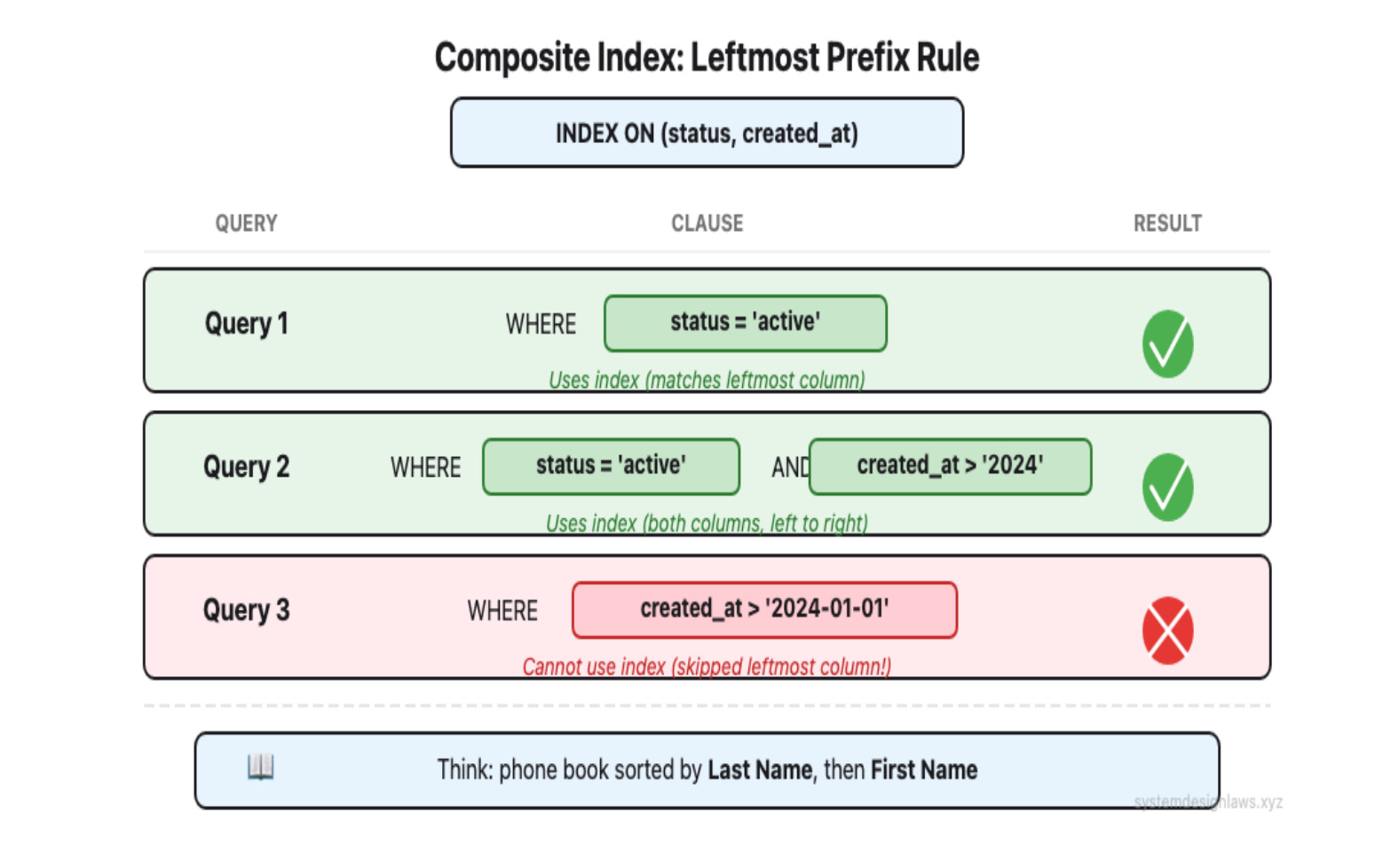
Composite indexes cover multiple columns. Column order matters - this is the leftmost prefix rule. An index on (status, created_at) helps WHERE status = 'active', and WHERE status = 'active' AND created_at > X, but NOT WHERE created_at > X alone.
You will read outdated resources warning about "too many indexes" slowing down writes. While index overhead is real, this fear is dramatically overblown. Modern hardware handles well-designed indexes efficiently. In interviews, confidently add indexes for your query patterns - under-indexing kills more applications than over-indexing ever will.
Interview tip: When outlining your database schema, mention which columns you will add indexes to. This shows you are thinking about performance from the start.
Hardware Upgrades (Vertical Scaling)
Sometimes the answer is just better hardware. Boring, but effective.
SSDs instead of HDDs - 10-100x faster random I/O
More RAM - More dataset sits in memory instead of on disk
Faster CPUs, more cores - Handle more concurrent queries
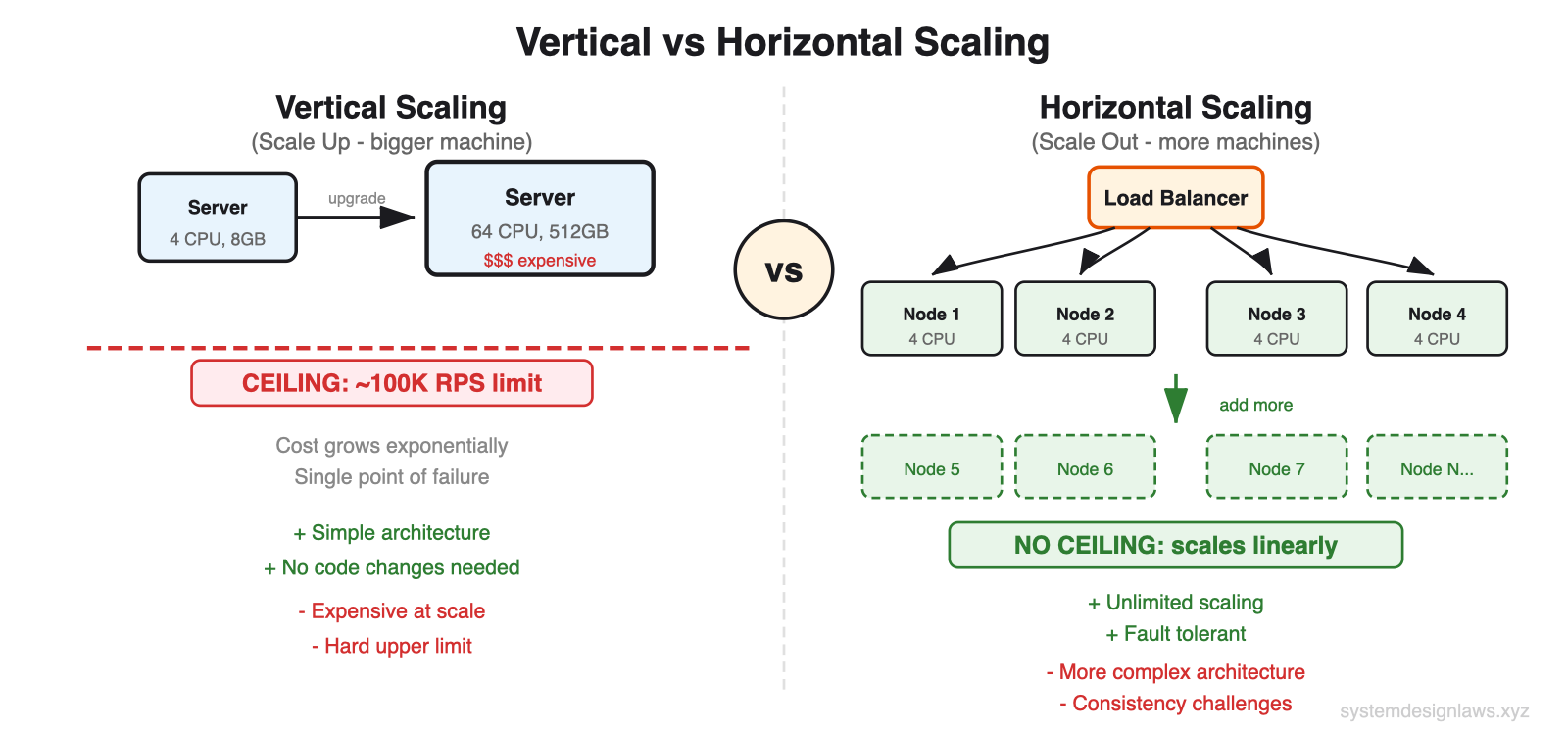
The ceiling: A single machine tops out at roughly 50,000-100,000 reads per second. This is a rough estimate - the actual number depends on your read patterns, data model, and hardware. But in an interview, rough estimates are enough to justify your decision to scale horizontally.
It does not hurt to mention hardware scaling, though this is rarely what the interviewer is looking for, as it sidesteps the architectural question.
Denormalization
Normalization structures data to reduce redundancy by splitting information across multiple tables. This saves storage space but makes queries more complex because you need joins.
Denormalization is the opposite: store redundant data to avoid joins. You trade storage for speed.
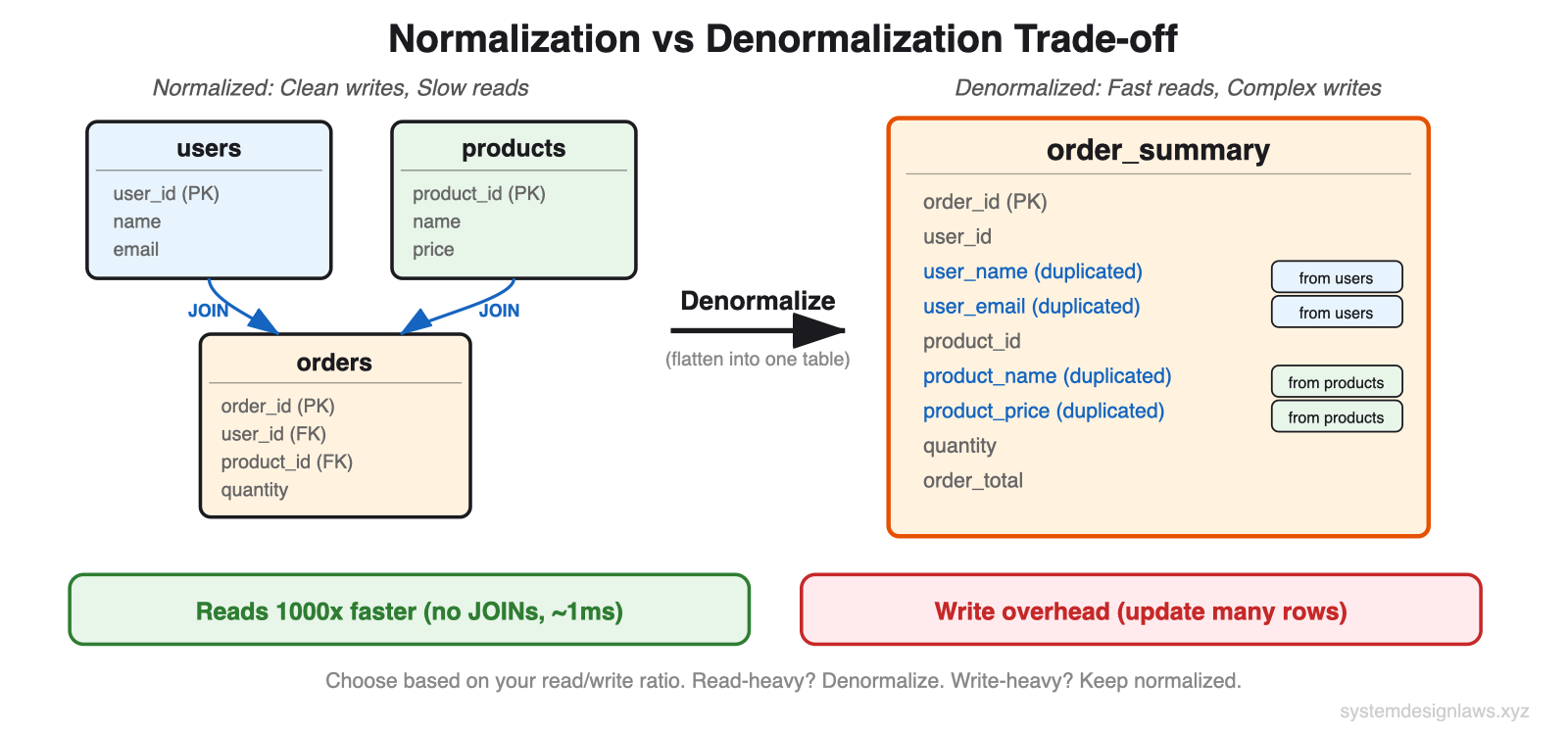
Schema: Normalized design (separate tables, requires joins)
users - id (PK), name, email
orders - id (PK), user_id (FK), order_date, total
products - id (PK), name, price, category
Query: Order summary - Join across all tables. Expensive at thousands of QPS. The database matches foreign keys, combines results.
Schema: Denormalized design (single table, pre-joined)
- order_summary - id (PK), user_name, order_date, product_name, price
Query: Order summary - Single table read. No joins. 10x faster. Yes, you store the same user name in multiple places. But for a read-heavy system, this storage cost is worth the speed improvement.
Denormalization is a classic example of optimizing for reads at the expense of writes. Always consider your read/write ratio before denormalizing. If writes are frequent, the complexity may not be worth it.
Materialized Views
Materialized views take denormalization further by precomputing expensive aggregations. Instead of calculating average product ratings on every page load, compute them once via a background job and store the results.
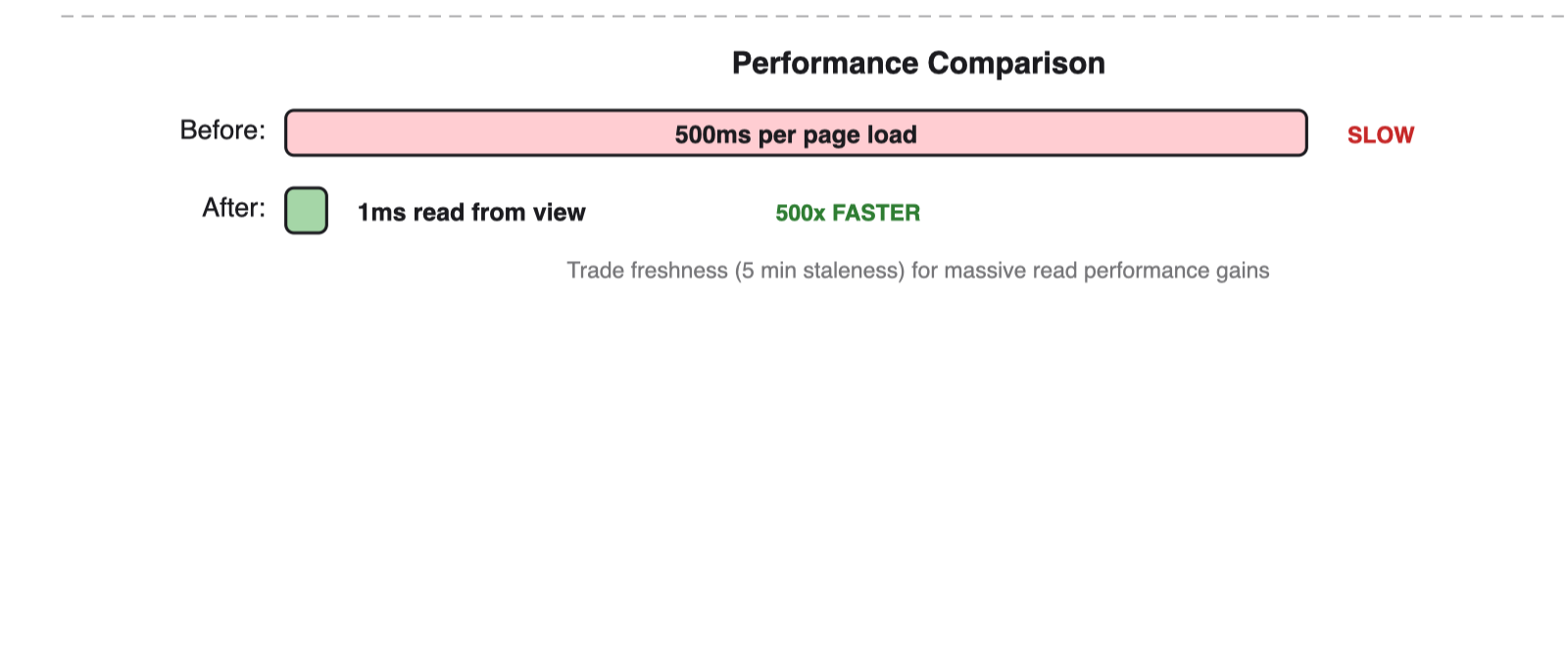
The background job runs on a schedule (every 5 minutes), not on every page load. Reads become a simple lookup against the precomputed table. Especially powerful for analytics queries across large datasets.
Tier 2: Scale Your Database Horizontally
When a single database server hits its limits, add more servers. General rule: scale horizontally when you exceed 50,000-100,000 reads per second (assuming proper indexing).
Read Replicas
Read replicas copy data from your primary database to additional servers. All writes go to the primary, but reads can go to any replica. This distributes read load across multiple servers.
Leader-follower replication is the standard approach. One primary (leader) handles writes, multiple secondaries (followers) handle reads. Replication can be synchronous (slower but consistent) or asynchronous (faster but potentially stale).
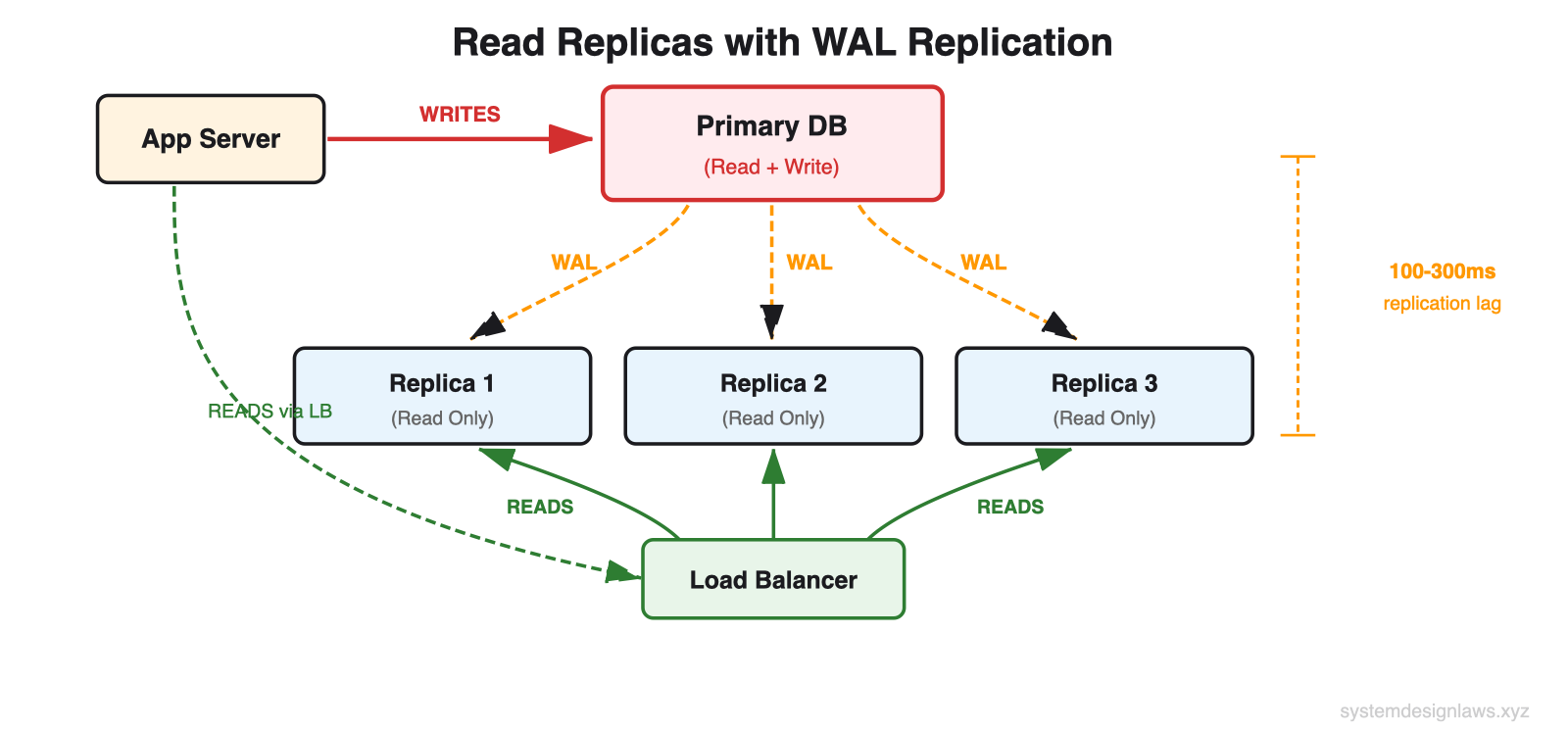
Beyond throughput, read replicas also provide redundancy. If your primary database fails, you can promote a replica to become the new primary, minimizing downtime.
The key challenge is replication lag. When you write to the primary, it takes time to propagate to replicas. Users might not see their own changes immediately if they read from a lagging replica.
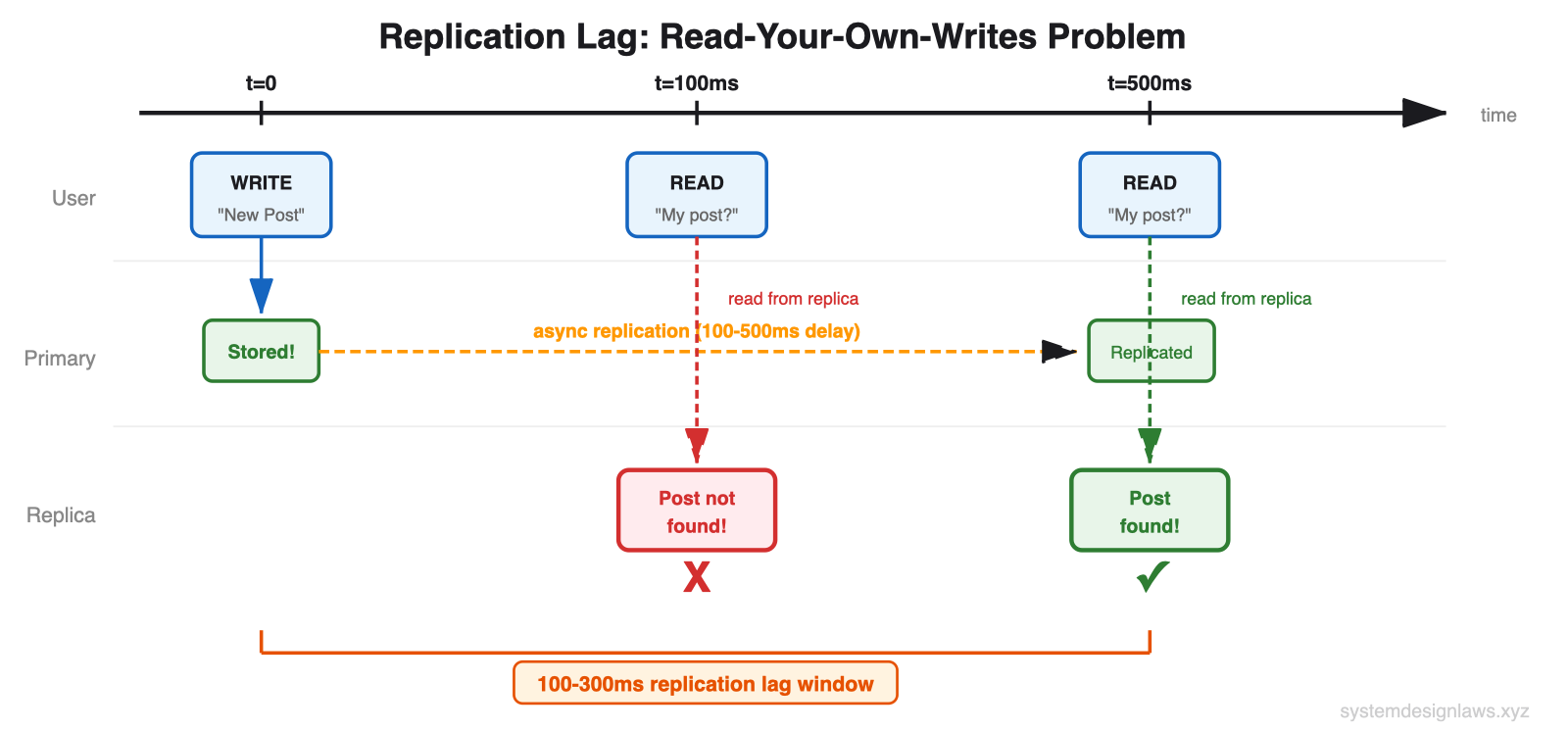
Replication lag is a common interview question. You need to understand the trade-offs: synchronous replication ensures data consistency but introduces latency. Asynchronous replication is faster but introduces potential stale reads. The "read-your-own-writes" pattern routes a user's reads to the primary for a short window after their write.
Database Sharding
Read replicas distribute load but do not reduce the dataset size each database handles. If your dataset becomes so large that even well-indexed queries are slow, sharding splits data across multiple databases.
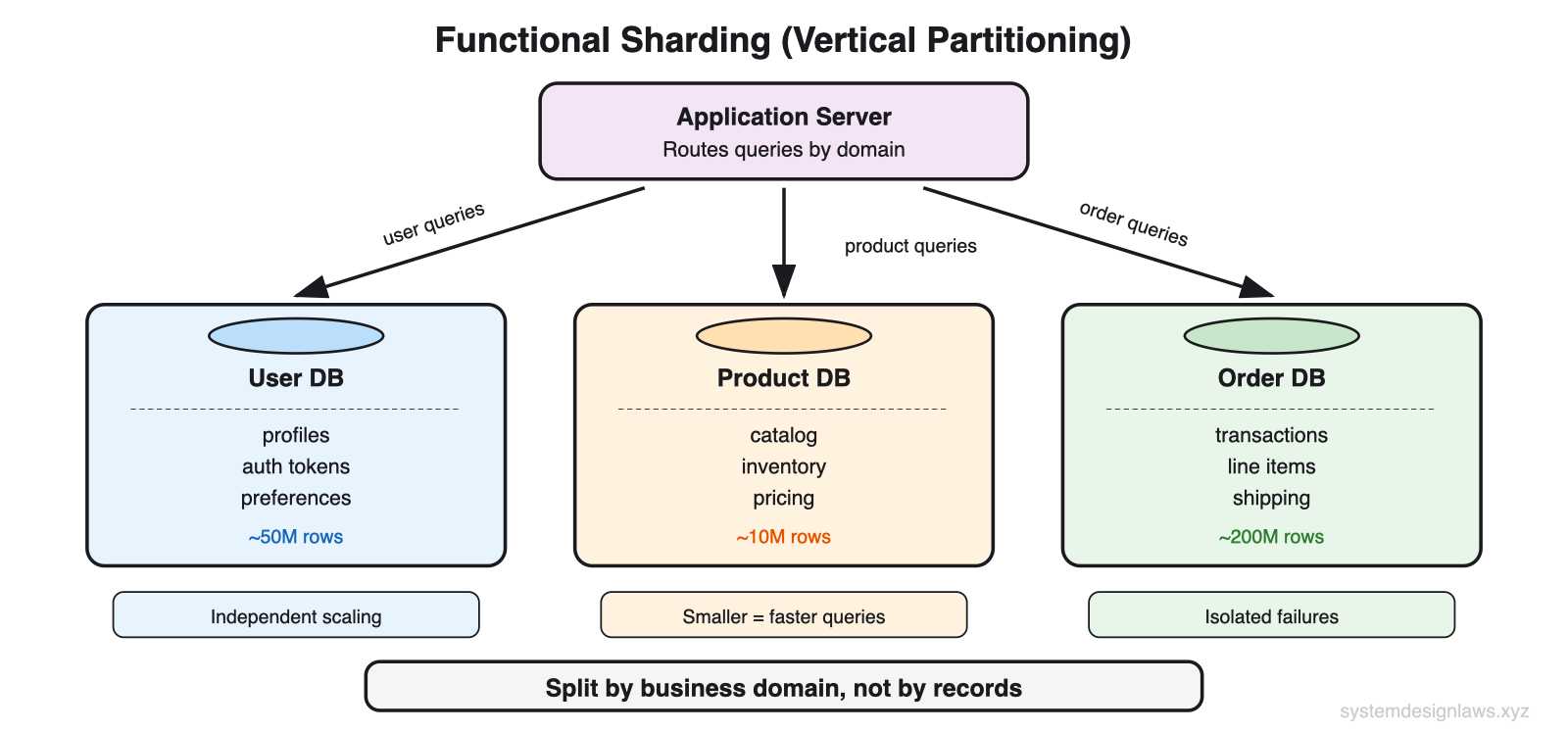
For read scaling, sharding helps two ways: smaller datasets mean faster individual queries, and you distribute read load across multiple databases.
Functional sharding splits by business domain:
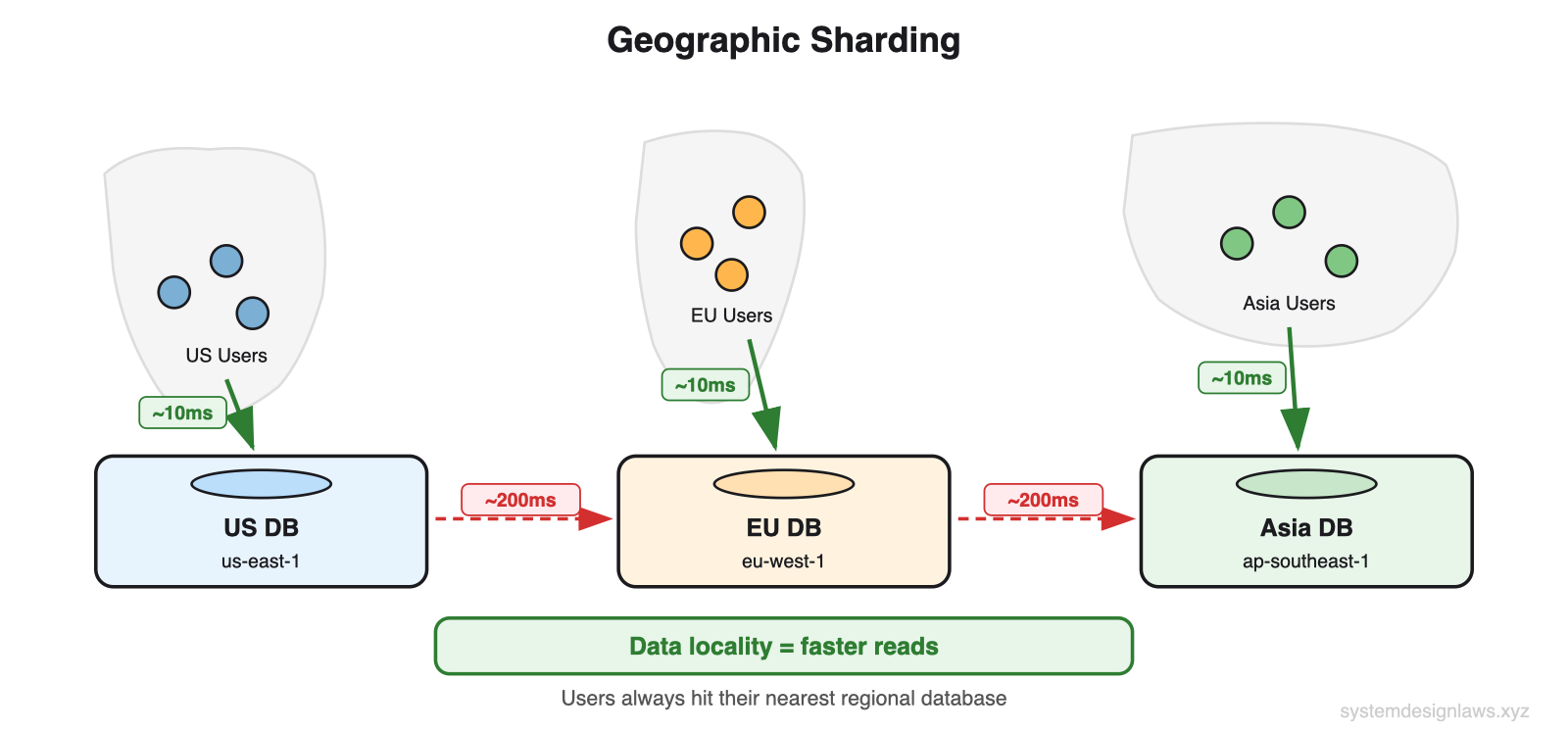
Geographic sharding is effective for global read scaling:
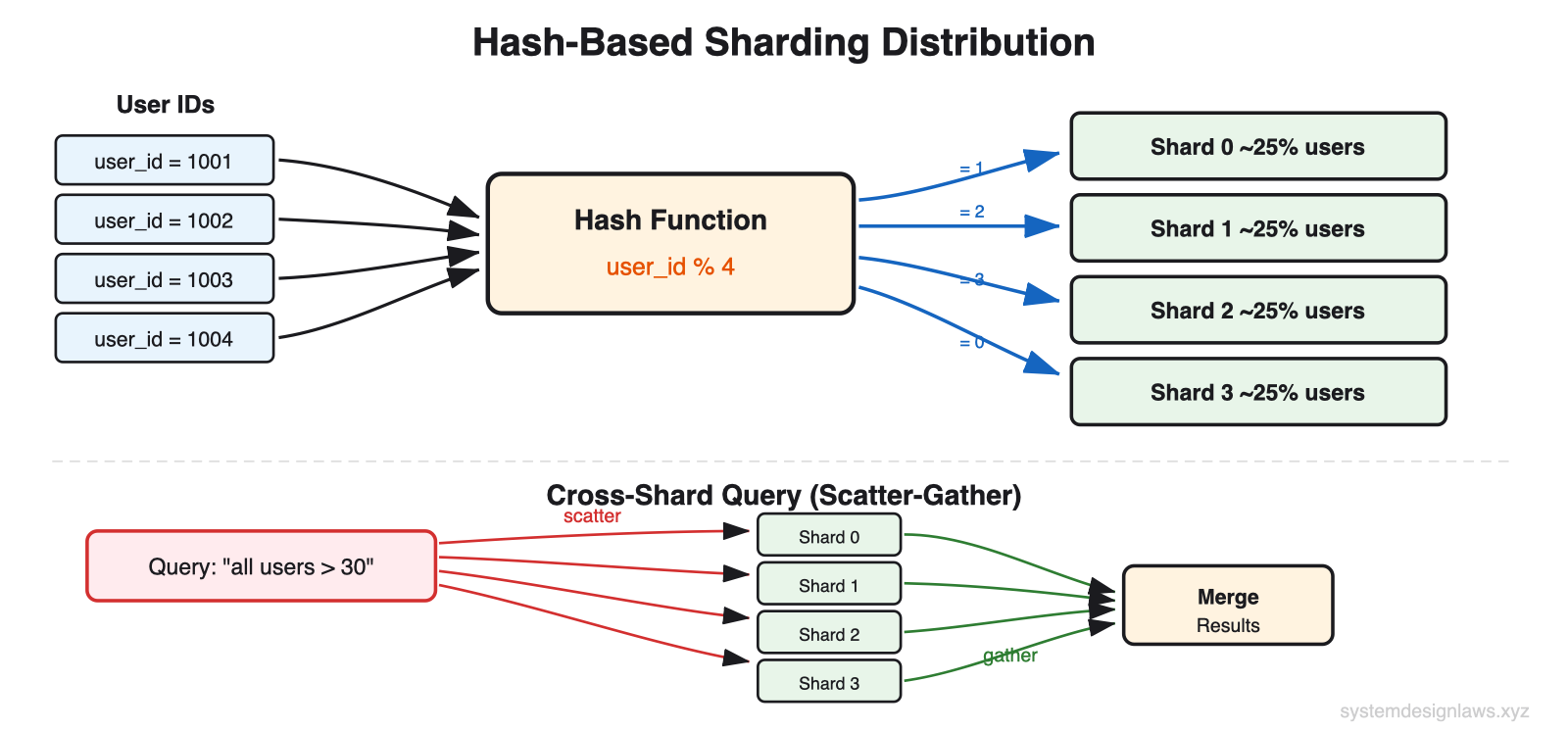
Hash-based sharding distributes records evenly:
Important: Sharding adds significant operational complexity and is primarily a write scaling technique. For most read scaling problems, adding caching layers is more effective and easier to implement.
Tier 3: Add External Caching Layers
When you have optimized your database but still need more read performance, add caching. Most applications exhibit highly skewed access patterns. Millions read the same viral tweets. Thousands view the same products. You are repeatedly querying for identical data that rarely changes.
Caches exploit this by storing frequently accessed data in memory. While databases read from disk and execute queries, caches serve pre-computed results directly from RAM. Sub-millisecond response times versus tens of milliseconds.
Application-Level Caching (Redis, Memcached)
In-memory caches sit between your application and database. On a cache hit, you get sub-millisecond response times. On a miss, you query the database and populate the cache for future requests.
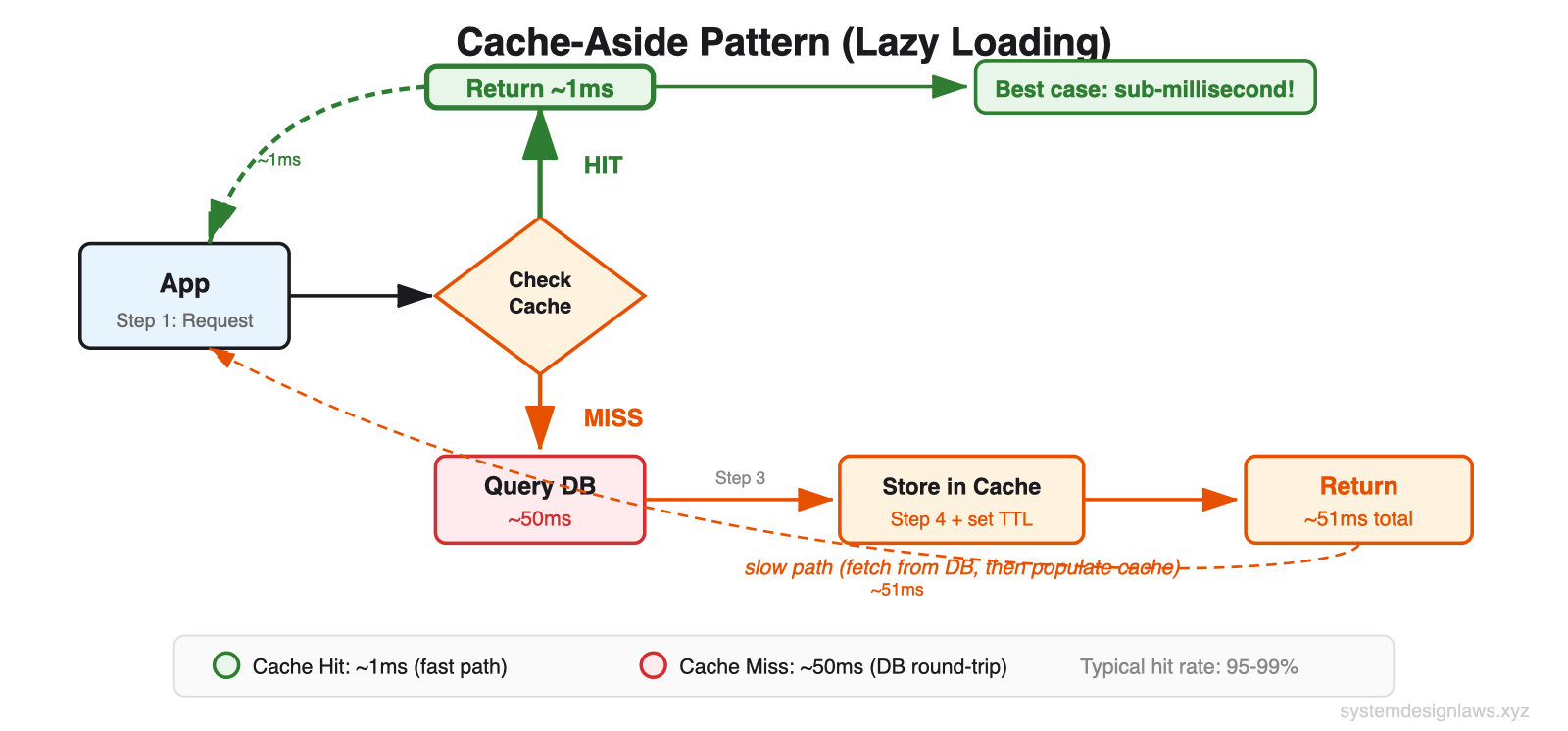
Popular data naturally stays in cache. Celebrity profiles remain cached continuously due to constant access. Inactive user profiles get cached only when accessed, then expire after the TTL.
Cache Invalidation Strategies
Cache invalidation remains the primary challenge. When data changes, you need to ensure caches do not serve stale data. The diagram below shows all five strategies with their trade-offs:
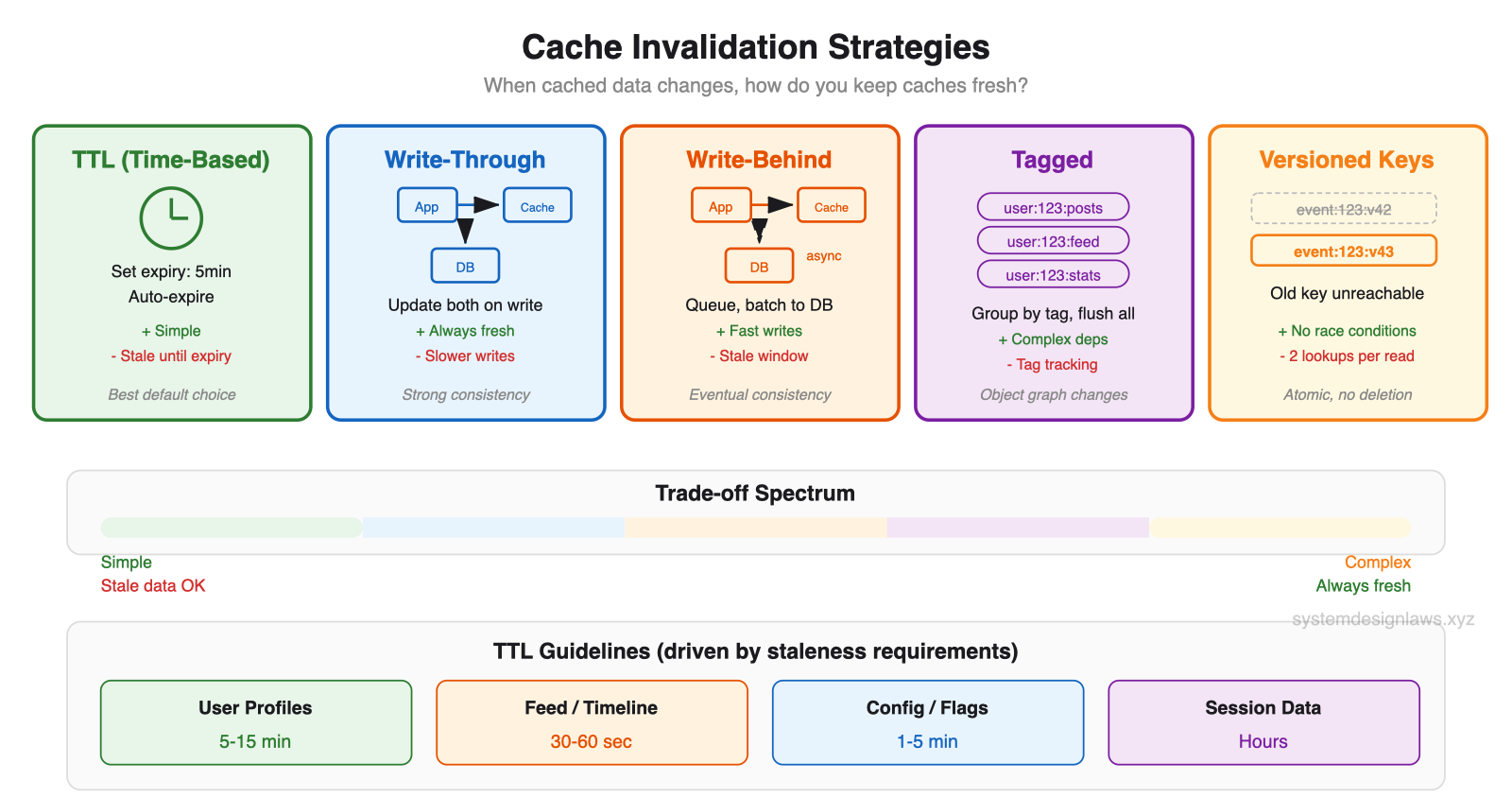
TTL (Time-Based Expiration) - Set a fixed lifetime for cached entries. When the timer expires, the entry is evicted and the next request fetches fresh data from the database. Simple to implement because you set it once and forget it. The downside: you serve stale data until expiry. If data changes at minute 1 of a 5-minute TTL, users see stale data for 4 minutes.
Write-Through - Update the cache immediately whenever you write to the database. Both stores are always in sync. The cache is always fresh. The cost: every write now has two operations (cache + DB), which adds latency. If either fails, you need error handling to avoid inconsistency.
Write-Behind (Write-Back) - Write to the cache first, then asynchronously batch-write to the database in the background. Writes are fast because the user only waits for the cache write. But there is a window where the cache has new data that the database does not yet have. Risk: if the cache dies before flushing, data is lost.
Tagged Invalidation - Associate cache entries with tags like user:123:posts, user:123:feed, user:123:stats. When user 123 updates their profile, invalidate ALL entries tagged with user:123. Powerful for complex dependency graphs where one change affects many cached items.
Versioned Keys - Include a version number in the cache key: event:123:v42. When the data changes, increment the version to v43 and write new data as event:123:v43. The old entry (v42) is never deleted - it becomes unreachable because nobody asks for v42 anymore. No race conditions because version changes are atomic in the database.
How to set TTL: Ideally driven by non-functional requirements. "Search results should be no more than 30 seconds stale" gives you your exact TTL. User profiles tolerating 5-minute staleness get a 5-minute TTL. Most production systems combine approaches: short TTLs as a safety net, with active invalidation for critical data.
TTL guidelines by data type:
User profiles - 5-15 minutes (change rarely)
Feed/timeline - 30-60 seconds (update frequently)
Config/feature flags - 1-5 minutes (infrequent changes)
Session data - Hours (tied to user session)
CDN and Edge Caching
CDNs extend caching to global edge locations. A user in Tokyo gets cached data from a Tokyo edge server rather than a round trip to your Virginia data center. Response times drop from 200ms to under 10ms.
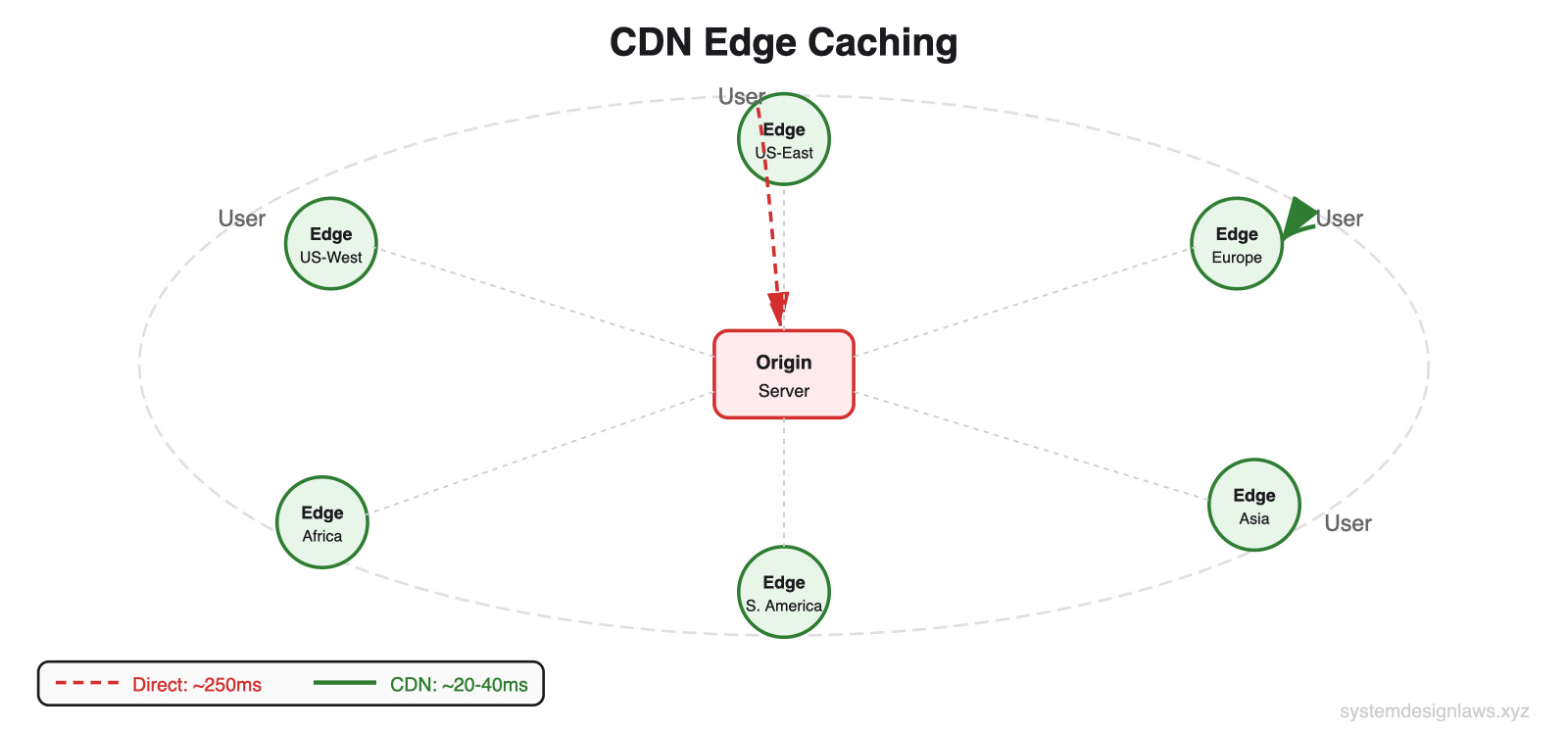
For read-heavy applications, CDN caching can reduce origin load by 90% or more. Product pages, user profiles, search results - anything multiple users request becomes a candidate. CDNs only make sense for data accessed by multiple users. Do NOT cache user-specific data like personal preferences or private messages - hit rate is zero.
Common Deep Dives (What Interviewers Ask Next)
"Queries slow as dataset grows"
Your app launched with 10,000 users and queries were snappy. Now you have 10 million users and simple lookups take 30 seconds. Without proper indexing, the database performs full table scans on every query. Finding one user by email means reading through all 10 million records.
The problem compounds with joins. Fetching a user's orders without indexes means scanning the entire users table, then the entire orders table. Billions of row comparisons.
Solution: Add indexes on columns you query frequently. An index on email turns that 10M row scan into a few index lookups. For compound queries, column order in the index matters. An index on (status, created_at) helps both status-only queries and combined queries, but NOT created_at-only queries.
"Millions of concurrent reads for the same cached data"
A celebrity posts on your platform. Suddenly millions of users try to read it. Your cache server getting 500,000 requests per second for a single key starts timing out. Even though data is in memory, serializing and sending it 500K times per second overwhelms any single server.
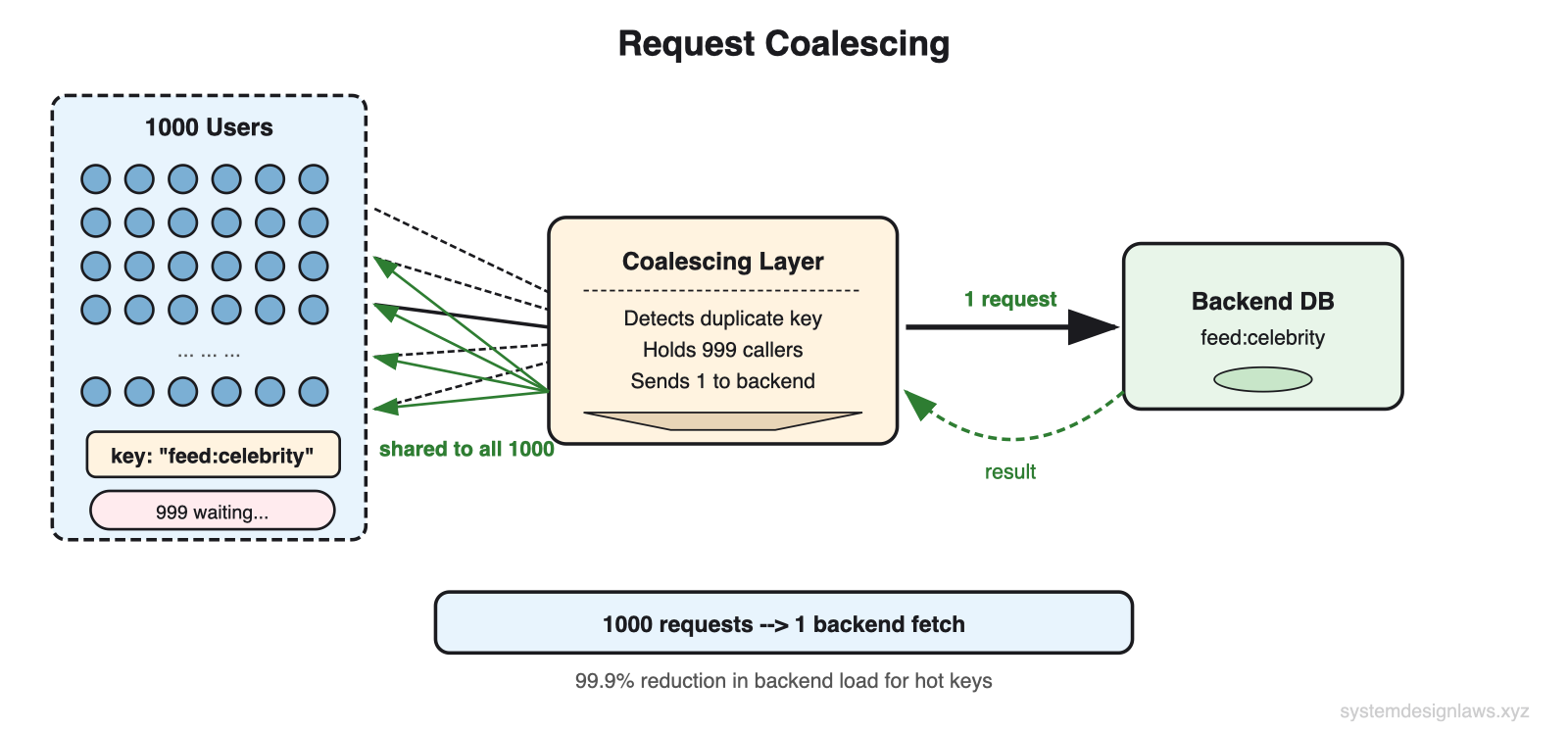
Request coalescing combines duplicate in-flight requests. If 1000 requests arrive for the same key at the same time, only one fetches from the backend. The rest wait for that result. This reduces backend load from potentially infinite to exactly N, where N is the number of application servers.
Cache key fanout distributes a single hot key across multiple entries. Store identical copies under feed:celebrity:1 through feed:celebrity:10. Clients randomly pick one. 500K RPS spread across 10 keys = 50K each. Trade-off: more memory and more complex invalidation, but you stay online.
"Cache stampede when popular entry expires"
Homepage data gets 100K RPS from cache. TTL expires. All 100K requests see a cache miss in the same instant. Every one tries to fetch from the database. Your DB, sized for 1,000 QPS during normal misses, gets hit with 100K identical queries. It crashes - a DDoS from your own application.
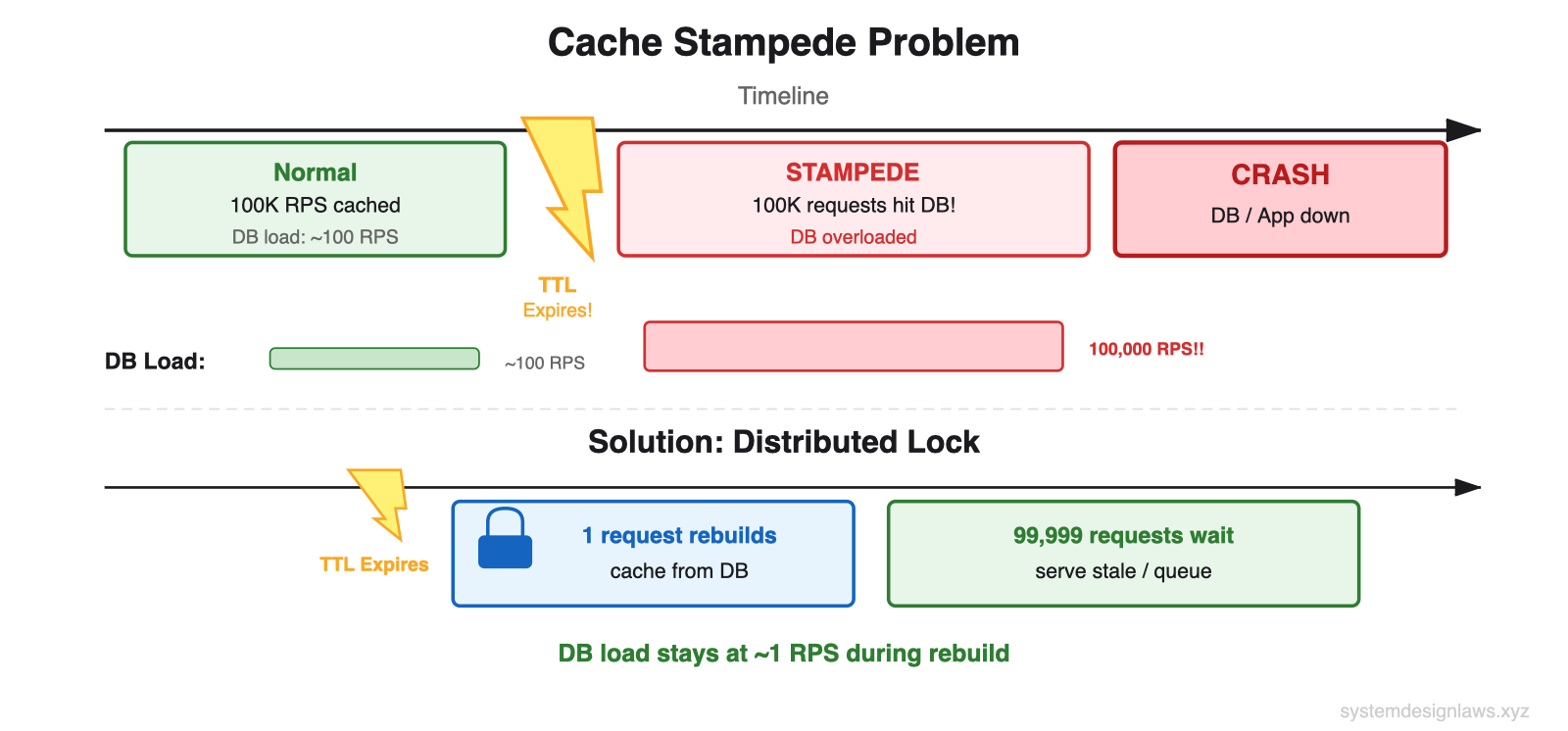
Distributed lock (SETNX) - First request acquires lock and rebuilds. Others wait. Downside: if rebuild fails or takes too long, thousands of requests timeout.
Probabilistic early refresh - As cache entry ages, each request has a small random chance of triggering a background refresh. At minute 50 of a 60-minute TTL: 1% chance. At minute 59: 20% chance. Spreads rebuilds across time instead of a single thundering herd.
Background refresh - Dedicated process refreshes critical entries before expiration. Users never trigger rebuilds. Most reliable for your most popular content.
"Cache invalidation when updates must be visible immediately"
A naive approach is delete the cache entry after a write. But this introduces race conditions: a request between delete and rewrite caches stale data again.
Cache versioning solves this. Each record has a version number in the database. On update, increment the version atomically. Cache key includes the version.
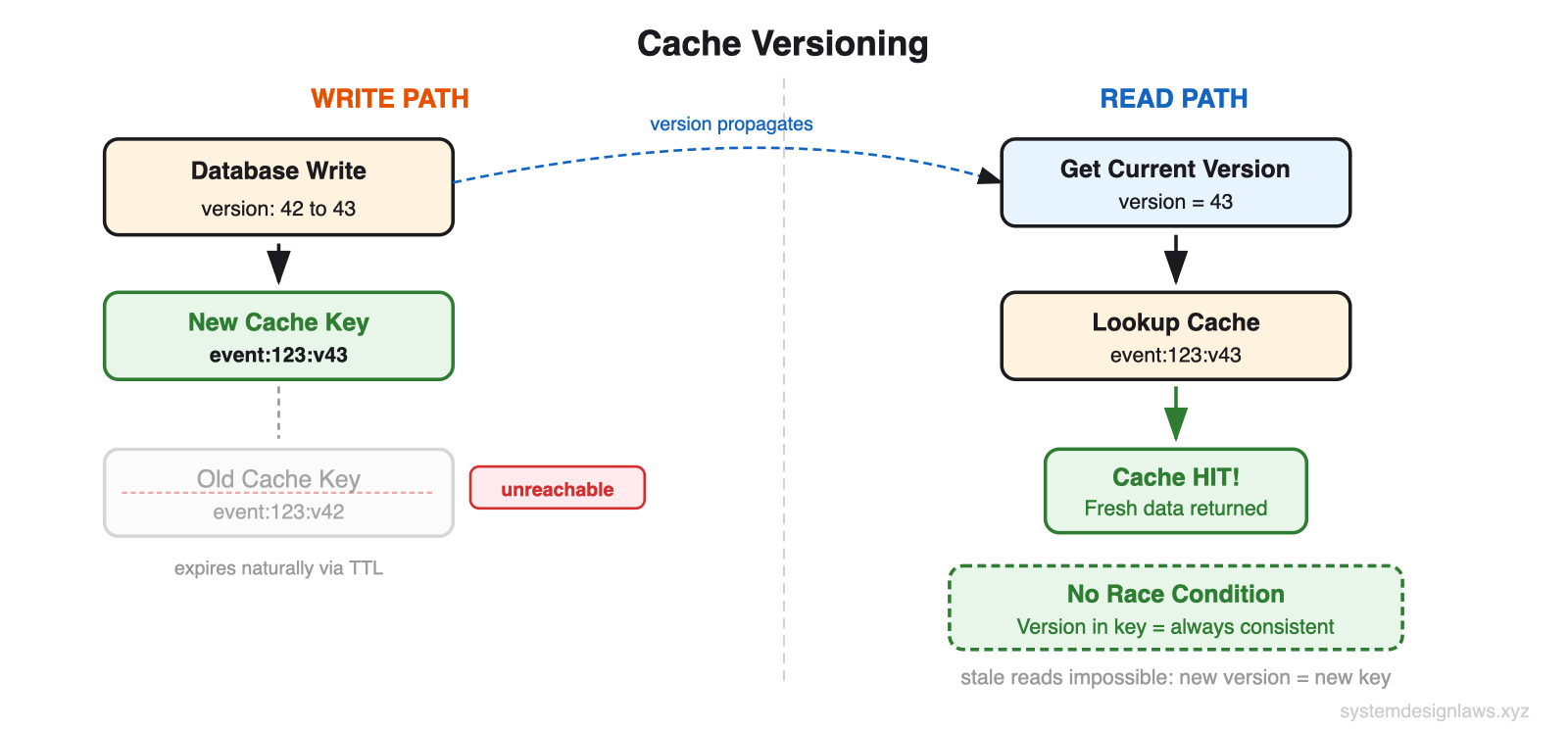
How it works: On READ: get version (43) from small version key, then lookup event:123:v43. On WRITE: update DB, increment version to 44, write new data as event:123:v44. Old entry event:123:v43 is never deleted - it becomes unreachable. No race conditions because version changes are atomic in the database. Two cache lookups per request (version + data), but no invalidation complexity.
When to Use in Interviews
A strong candidate identifies read bottlenecks proactively. When you sketch your API design, pause at endpoints that will get hammered and say: "This user profile endpoint will get hit every time someone views a profile. With millions of users, that is potentially billions of reads per day. Let me address that."
Common scenarios with specific advice:
Bit.ly/URL Shortener - Extreme read/write ratio. Cache short-to-long URL mapping in Redis with no expiration (URLs don't change). Use CDN for global traffic. DB only hit for cache misses on unpopular links.
Ticketmaster - Event pages hammered when tickets go on sale. Cache event details, venue info, seating charts. But actual seat availability cannot be cached or you will oversell. Read replicas for browsing, write master for purchases.
News Feed (Facebook/LinkedIn/Twitter) - Pre-compute feeds for active users. Cache recent posts from followed users. Smart pagination - users typically only read the first few items, so cache recent content aggressively.
YouTube - Video metadata creates surprising read load. Cache titles, descriptions, thumbnails (don't change often). View counts can be eventually consistent, updated every few minutes. CDNs for thumbnail images.
When NOT to use:
Write-heavy - Uber location tracking (drivers update every few seconds). Read/write ratio might only be 2:1. Focus on write scaling.
Small scale - "Design for 1000 users." A well-indexed single database handles thousands of QPS. Show judgment by solving the actual problem.
Strongly consistent - Financial transactions, inventory. Stale data causes real problems. You might still cache but with aggressive invalidation and shorter TTLs.
Real-time collaborative - Google Docs needs real-time updates, not read scaling. Caching actively hurts when every keystroke needs to be immediately visible.
Remember: Read scaling is about reducing database load, not just making things faster. If your database handles the load fine but you need lower latency, that is a different problem with different solutions.
Summary
Most candidates jump straight to complex distributed caching without exhausting simpler solutions. Start with what you have - modern databases can handle far more load than most engineers realize when properly indexed and configured.
1. Optimize the database - Indexing turns O(n) into O(log n). Denormalization eliminates joins. Hardware buys time.
2. Read replicas - Nx capacity. Understand replication lag and read-your-own-writes consistency.
3. Sharding - Splits data across nodes. Functional, geographic, or hash-based. Primarily a write scaling technique.
4. Application caching (Redis) - Sub-millisecond reads. Cache-aside is the default. Master cache invalidation strategies.
5. CDN - Edge servers worldwide. Reduces origin load 90%+. Only for multi-user content.
In interviews, demonstrate that you understand both the performance benefits and the operational complexity of each approach. Show that you know when to use aggressive caching for static content and when to lean on read replicas for data that needs to stay fresh.